Hướng Dẫn Tích Hợp ModSecurity + OWASP CRS Vào Nginx
HƯỚNG DẪN TÍCH HỢP MODSECURITY + OWASP CRS VÀO NGINX
Ubuntu 24.04 LTS • Nginx 1.24.0 • ModSecurity v3 • OWASP CRS 3.3.5
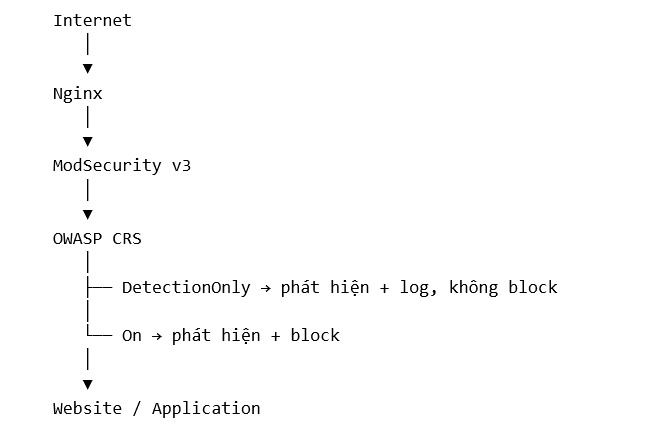
1. Mục tiêu và kiến trúc
Tài liệu này tổng hợp quy trình kiểm tra Nginx, cài đặt ModSecurity v3 và OWASP Core Rule Set (CRS), tích hợp ModSecurity vào Nginx, kiểm tra ở chế độ DetectionOnly, chuyển sang chế độ block, kiểm tra audit log và cấu hình URL exclusion.
2. Môi trường đã kiểm tra
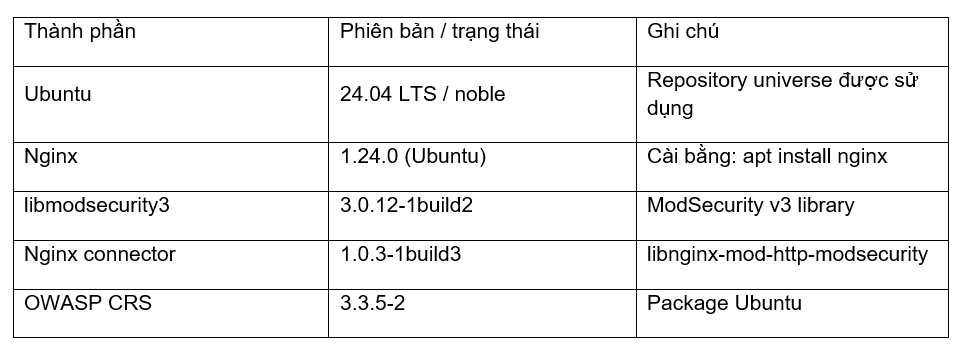
3. Cài đặt nginx:
Để lấy repos nginx mới nhất gõ: apt update
Kiểm tra repo nginx hiện tại : apt policy nginx
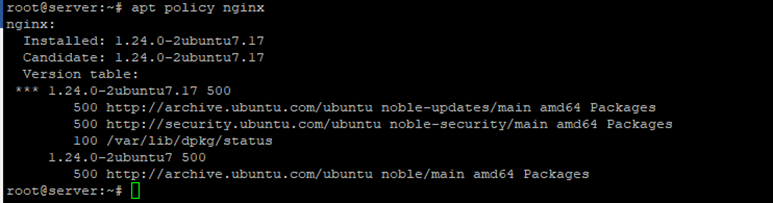
Cài nginx : apt install nginx
4. Kiểm tra và cài ModSecurity
Kiểm tra phiên bản và cách Nginx được build:
nginx -v
nginx -V 2>&1
Trong môi trường đã kiểm tra, Nginx là 1.24.0 (Ubuntu), có đường dẫn dynamic modules tại /usr/lib/nginx/modules. Vì vậy không cần compile lại Nginx; có thể dùng module ModSecurity do Ubuntu đóng gói.

Kiểm tra package ModSecurity và CRS
apt update
apt policy libnginx-mod-http-modsecurity
apt policy modsecurity-crs
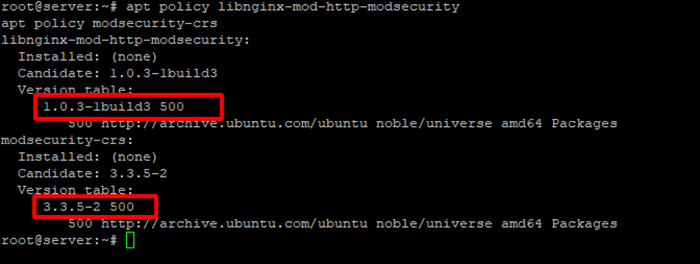
Nếu package có Candidate trong repository noble/universe, có thể cài trực tiếp bằng APT.
Cài ModSecurity và OWASP CRS
apt install libnginx-mod-http-modsecurity modsecurity-crs
Kiểm tra package:
dpkg -l libnginx-mod-http-modsecurity modsecurity-crs
Khi module được cài đúng sẽ thấy:

5. Cấu trúc file ModSecurity trên Ubuntu 24.04
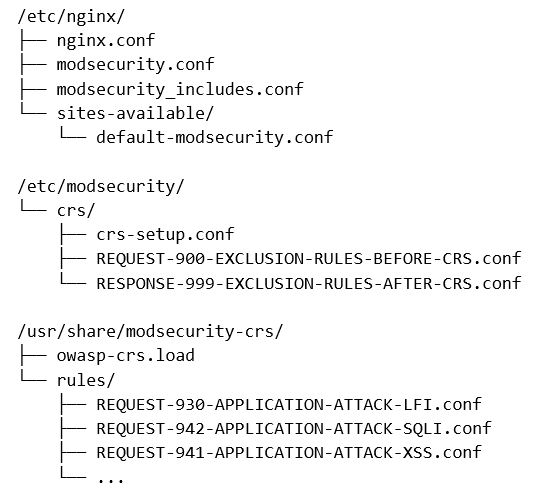
default-modsecurity.conf: là file mẫu do package cung cấp. Không nên dùng file mẫu này làm nơi cấu hình chính cho hệ thống nhiều website; cấu hình tích hợp nên đặt trong nginx.conf và các file ModSecurity riêng.
modsecurity_includes.conf:file này làm nhiệm vụ nối cấu hình ModSecurity với OWASP CRS.
include modsecurity.conf
Include /usr/share/modsecurity-crs/owasp-crs.load
File /usr/share/modsecurity-crs/owasp-crs.load sẽ include:
Include /etc/modsecurity/crs/crs-setup.conf
Include /etc/modsecurity/crs/REQUEST-900-EXCLUSION-RULES-BEFORE-CRS.conf
Include /usr/share/modsecurity-crs/rules/*.conf
Include /etc/modsecurity/crs/RESPONSE-999-EXCLUSION-RULES-AFTER-CRS.conf
Lưu ý: Package CRS của Ubuntu có thể sử dụng IncludeOptional trong owasp-crs.load. ModSecurity-nginx không hỗ trợ IncludeOptional theo cấu hình này, gây lỗi nginx -t. Trong trường hợp đã kiểm tra, hai dòng IncludeOptional được đổi thành Include vì các file exclusion đều tồn tại.
6. Cấu hình ModSecurity:
-Giai đoạn triển khai đầu tiên nên dùng DetectionOnly để phát hiện false positive mà chưa block.
Kiểm tra bằng lệnh:grep -n “SecRuleEngine” /etc/nginx/modsecurity.conf
phải thấy :
SecRuleEngine DetectionOnly
-Chỉnh sửa file modsecurity_includes.conf
nano /etc/nginx/modsecurity_includes.conf
include modsecurity.conf
include /usr/share/modsecurity-crs/owasp-crs.load
-Chỉnh sửa file owasp-crs.load
nano /usr/share/modsecurity-crs/owasp-crs.load
Include /etc/modsecurity/crs/crs-setup.conf
Include /etc/modsecurity/crs/REQUEST-900-EXCLUSION-RULES-BEFORE-CRS.conf
Include /usr/share/modsecurity-crs/rules/*.conf
Include /etc/modsecurity/crs/RESPONSE-999-EXCLUSION-RULES-AFTER-CRS.conf
7. Tích hợp ModSecurity vào Nginx
- Để áp dụng cho toàn bộ các virtual host trong Nginx, đặt hai directive sau bên trong context http của /etc/nginx/nginx.conf:
http {

    modsecurity on;
    modsecurity_rules_file /etc/nginx/modsecurity_includes.conf;

    ...
}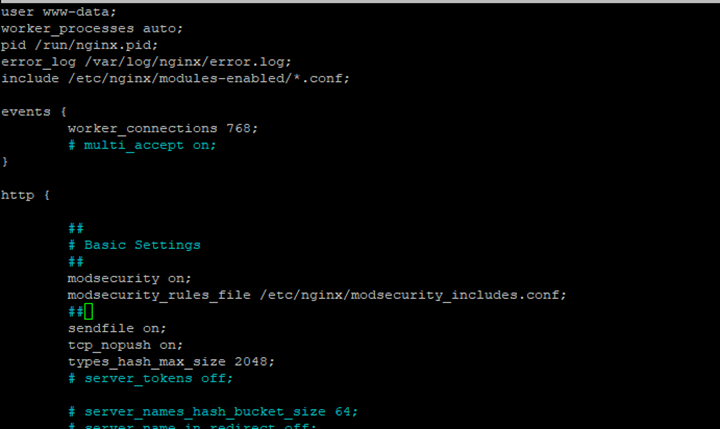
Không đặt hai directive này bên ngoài http/server/location. Với hệ thống nhiều website, cấu hình tại http giúp áp dụng nhất quán cho toàn bộ server block.
- Kiểm tra ModSecurity và CRS đã load
nginx -t

Kết quả thực tế đã xác nhận: ModSecurity-nginx v1.0.3 và rules loaded inline/local/remote: 0/921/0. Điều này chứng minh 921 CRS rules đã được load thành công.
- Chạy Reload Nginx
systemctl reload nginx
Luôn chạy nginx -t trước khi reload để tránh đưa cấu hình lỗi vào Nginx.
- audit log
tail -f /var/log/nginx/modsec_audit.log
8. Test WAF
Lấy 1 máy (ở đây đang dùng Ubuntu) từ ngoài internet gõ comand
Mode DetectionOnly
Một request SQL injection thử nghiệm:
curl -skL -o /dev/null -w "%{http_code}\n" "https://abc.test/?id=1%27%20OR%20%271%27=%271"
Ở DetectionOnly, HTTP 200 là kết quả đúng: CRS phát hiện request nhưng không block. Cần kiểm tra audit log và rule ID thay vì chỉ nhìn HTTP status.
Chuyển sang chế độ block
Sửa cấu hình nano /etc/nginx/modsecurity.conf
SecRuleEngine DetectionOnly
thành:
SecRuleEngine On
nginx -t
systemctl reload nginx
Khi test SQL injection lại
curl -skL -o /dev/null -w "%{http_code}\n" "https://abc.test/?id=1%27%20OR%20%271%27=%271"

CRS block thành công, curl trả về 403. Đây là cách xác nhận ModSecurity + CRS đang thực sự chặn request.
9. URL exclusion
Nếu yêu cầu là bypass toàn bộ ModSecurity cho một URL cụ thể, không phụ thuộc IP, có thể dùng exclusion trước CRS. Ví dụ cho đúng URL https://abc.test/?page=..:
nano /etc/modsecurity/crs/REQUEST-900-EXCLUSION-RULES-BEFORE-CRS.conf
SecRule REQUEST_HEADERS:Host “@streq abc.test” \
“id:100001,phase:1,pass,nolog,chain”
SecRule REQUEST_URI_RAW “@streq /?page=..” \
“t:none,ctl:ruleEngine=Off”
Điều kiện đầu tiên xác định hostname. Điều kiện thứ hai match URI nguyên bản. Khi cả hai đúng, ctl:ruleEngine=Off sẽ bypass ModSecurity cho transaction đó. Không phụ thuộc IP.
Lưu ý: Cách này là bypass toàn bộ ModSecurity cho URL đã chỉ định. Chỉ sử dụng khi thực sự cần, vì payload độc hại đi qua URL đó cũng không được ModSecurity kiểm tra.
* Nhiều URL exclusion
Mỗi URL nên có một rule và một ID riêng để dễ quản lý.
SecRule REQUEST_HEADERS:Host “@streq abc.test” \
“id:100001,phase:1,pass,nolog,chain”
SecRule REQUEST_URI_RAW “@streq /?page=..” \
“t:none,ctl:ruleEngine=Off”
SecRule REQUEST_HEADERS:Host “@streq abc.test” \
“id:100002,phase:1,pass,nolog,chain”
SecRule REQUEST_URI_RAW “@streq /?xyz=..” \
“t:none,ctl:ruleEngine=Off”
Nên dành một dải ID riêng cho các rule tự tạo, ví dụ 100000–109999. Không dùng trùng ID.
10. Kiểm tra sau khi thêm exclusion
nginx -t && systemctl reload nginx
Sau đó test URL đã exclusion và test một payload khác để chắc chắn WAF vẫn hoạt động.
- URL được exclusion
curl -skL -o /dev/null -w "%{http_code}\n" "https://abc.test/?page=.."
=> Trả mã 200 - SQLi vẫn phải chịu WAF
curl -skL -o /dev/null -w "%{http_code}\n" "https://freeit.site/?id=1%27%20OR%20%271%27=%271"
=>Trả 403
11. Backup và nguyên tắc vận hành
· Luôn chạy nginx -t trước systemctl reload nginx.
· Triển khai DetectionOnly trước khi bật On cho production.
· Theo dõi audit log để xác định rule ID và false positive.
· Ưu tiên exclusion theo rule/parameter thay vì bypass toàn bộ URL.
· Nếu phải bypass URL, match cả Host và URI để tránh mở rộng phạm vi ngoài ý muốn.
· Mỗi custom exclusion phải có ID riêng.
· Không sửa trực tiếp các file rule CRS trong /usr/share/modsecurity-crs/rules/.
· Các file package trong /usr/share có thể bị cập nhật khi apt upgrade; custom exclusion nên đặt trong REQUEST-900-EXCLUSION-RULES-BEFORE-CRS.conf.
12. Kết luận
Với Ubuntu 24.04 và Nginx cài bằng APT, phương án phù hợp là dùng module libnginx-mod-http-modsecurity thay vì compile lại Nginx. ModSecurity v3 đóng vai trò engine WAF, còn OWASP CRS cung cấp bộ rule phát hiện tấn công. Quy trình an toàn là cài module → load CRS → DetectionOnly → kiểm tra log/rule → xử lý false positive → chuyển On → kiểm thử block → xây dựng exclusion có phạm vi nhỏ nhất.