How to Integrate ModSecurity + OWASP CRS with Nginx
HOW TO INTEGRATE MODSECURITY + OWASP CRS INTO NGINX
Ubuntu 24.04 LTS • Nginx 1.24.0 • ModSecurity v3 • OWASP CRS 3.3.5
1. Objective and Architecture
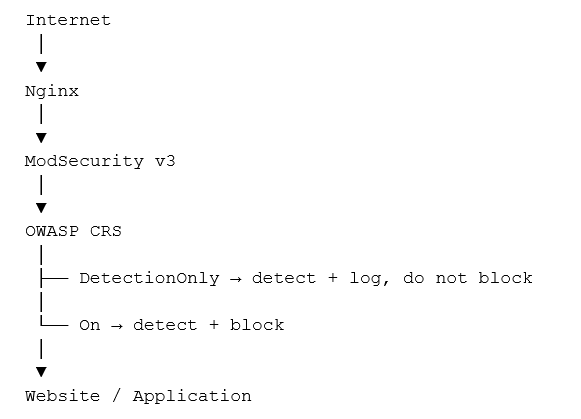
This document summarizes the procedures for checking Nginx, installing ModSecurity v3 and OWASP Core Rule Set (CRS), integrating ModSecurity into Nginx, testing DetectionOnly mode, switching to block mode, checking the audit log, and configuring URL exclusions.
2. Tested Environment
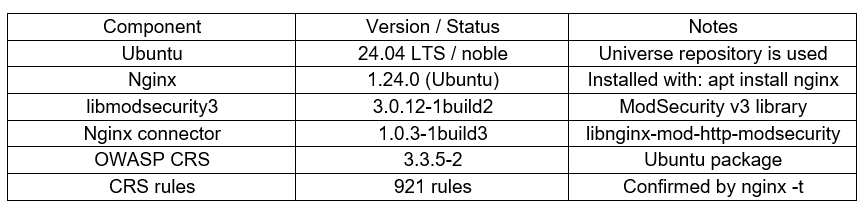
The server uses Ubuntu 24.04 (noble), with Nginx installed using APT.
3. Install nginx:
To get the latest nginx repository information, run:
apt update
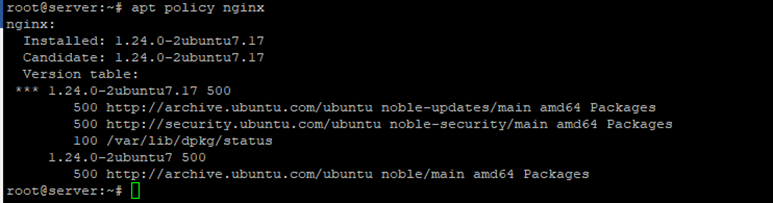
Check the current nginx repository:
apt policy nginx
Install nginx:
apt install nginx
4. Check and Install ModSecurity
Check the version and how Nginx was built:
nginx -v
nginx -V 2>&1
In the tested environment, Nginx is 1.24.0 (Ubuntu), with the dynamic modules path at /usr/lib/nginx/modules. Therefore, Nginx does not need to be compiled again; the ModSecurity module packaged by Ubuntu can be used.

Check the ModSecurity and CRS packages:
apt update
apt policy libnginx-mod-http-modsecurity
apt policy modsecurity-crs
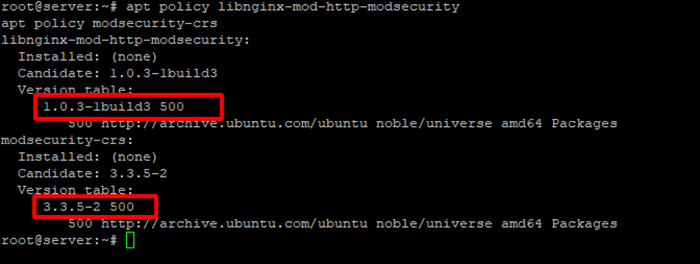
If the package has a Candidate in the noble/universe repository, it can be installed directly using APT.
Install ModSecurity and OWASP CRS
apt install libnginx-mod-http-modsecurity modsecurity-crs
Check the package:
dpkg -l libnginx-mod-http-modsecurity modsecurity-crs
When the module is installed correctly, you will see:

5. ModSecurity File Structure on Ubuntu 24.04
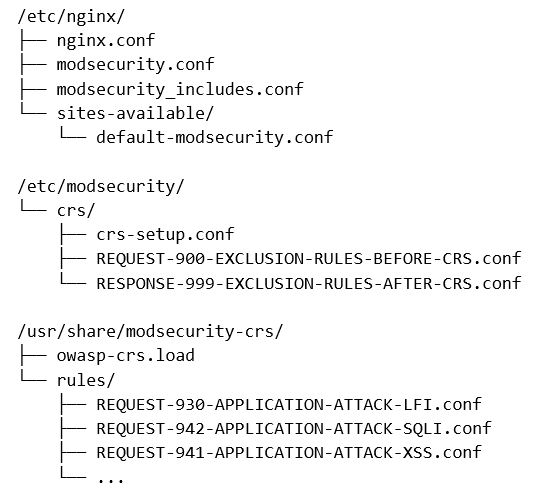
default-modsecurity.conf: this is a sample file provided by the package. It should not be used as the main configuration file for a multi-website system; the integration configuration should be placed in nginx.conf and separate ModSecurity files.
modsecurity_includes.conf: this file connects the ModSecurity configuration to OWASP CRS.
include modsecurity.conf
Include /usr/share/modsecurity-crs/owasp-crs.load
The file /usr/share/modsecurity-crs/owasp-crs.load will include:
Include /etc/modsecurity/crs/crs-setup.conf
Include /etc/modsecurity/crs/REQUEST-900-EXCLUSION-RULES-BEFORE-CRS.conf
Include /usr/share/modsecurity-crs/rules/*.conf
Include /etc/modsecurity/crs/RESPONSE-999-EXCLUSION-RULES-AFTER-CRS.conf
Note: The Ubuntu CRS package may use IncludeOptional in owasp-crs.load. ModSecurity-nginx does not support IncludeOptional with this configuration, causing nginx -t to fail. In the tested case, the two IncludeOptional lines were changed to Include because the exclusion files exist.
6. ModSecurity Configuration
- During the initial deployment stage, DetectionOnly should be used to detect false positives without blocking.
Check with:
grep -n “SecRuleEngine” /etc/nginx/modsecurity.conf
It should show:
SecRuleEngine DetectionOnly
- Edit modsecurity_includes.conf
nano /etc/nginx/modsecurity_includes.conf
include modsecurity.conf
include /usr/share/modsecurity-crs/owasp-crs.load
- Edit owasp-crs.load
nano /usr/share/modsecurity-crs/owasp-crs.load
Include /etc/modsecurity/crs/crs-setup.conf
Include /etc/modsecurity/crs/REQUEST-900-EXCLUSION-RULES-BEFORE-CRS.conf
Include /usr/share/modsecurity-crs/rules/*.conf
Include /etc/modsecurity/crs/RESPONSE-999-EXCLUSION-RULES-AFTER-CRS.conf
7. Integrate ModSecurity into Nginx
- To apply it to all virtual hosts in Nginx, place the following two directives inside the http context of /etc/nginx/nginx.conf:
http {

    modsecurity on;
    modsecurity_rules_file /etc/nginx/modsecurity_includes.conf;

    ...
}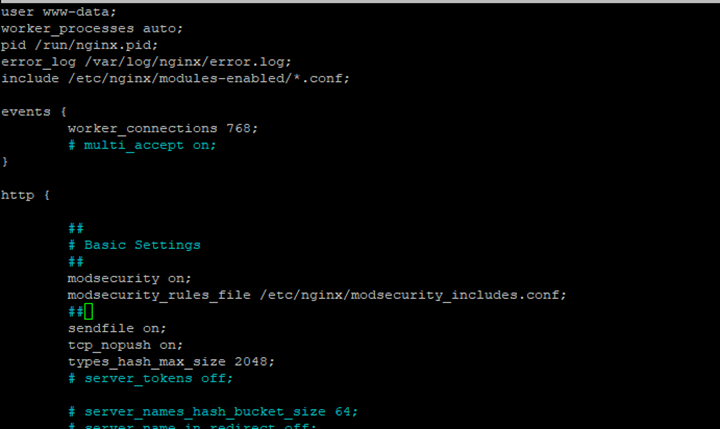
Do not place these two directives outside the http/server/location contexts. For a multi-website system, configuring them in http applies them consistently to all server blocks.
- Check whether ModSecurity and CRS have loaded
nginx -t

The actual result confirmed: ModSecurity-nginx v1.0.3 and rules loaded inline/local/remote: 0/921/0. This proves that 921 CRS rules were loaded successfully.
- Reload Nginx
systemctl reload nginx
Always run nginx -t before reload to avoid loading an invalid configuration into Nginx.
- audit log
tail -f /var/log/nginx/modsec_audit.log
8. Test WAF
Use one machine (Ubuntu is being used here) from the Internet and run the command.
Mode DetectionOnly
An example SQL injection request:
curl -skL -o /dev/null -w "%{http_code}\n" "https://abc.test/?id=1%27%20OR%20%271%27=%271"
In DetectionOnly, HTTP 200 is the expected result: CRS detects the request but does not block it. Check the audit log and rule ID rather than only looking at the HTTP status.
Switch to block mode
Edit the configuration:
nano /etc/nginx/modsecurity.conf
SecRuleEngine DetectionOnly
change to:
SecRuleEngine On
nginx -t
systemctl reload nginx
Test the SQL injection again:
curl -skL -o /dev/null -w "%{http_code}\n" "https://abc.test/?id=1%27%20OR%20%271%27=%271"

If CRS blocks successfully, curl returns 403. This confirms that ModSecurity + CRS is actually blocking the request.
9. URL exclusion
If the requirement is to bypass all ModSecurity for a specific URL, regardless of IP, an exclusion can be used before CRS. Example for the exact URL https://abc.test/?page=..:
nano /etc/modsecurity/crs/REQUEST-900-EXCLUSION-RULES-BEFORE-CRS.conf
SecRule REQUEST_HEADERS:Host “@streq abc.test”
“id:100001,phase:1,pass,nolog,chain”
SecRule REQUEST_URI_RAW “@streq /?page=..”
“t:none,ctl:ruleEngine=Off”
The first condition identifies the hostname. The second condition matches the raw URI. When both are true, ctl:ruleEngine=Off bypasses ModSecurity for that transaction. It does not depend on the IP.
Note: This method bypasses all ModSecurity for the specified URL. Use it only when really necessary, because malicious payloads passing through that URL will also not be inspected by ModSecurity.
* Multiple URL exclusions
Each URL should have its own rule and ID for easier management.
SecRule REQUEST_HEADERS:Host “@streq abc.test”
“id:100001,phase:1,pass,nolog,chain”
SecRule REQUEST_URI_RAW “@streq /?page=..”
“t:none,ctl:ruleEngine=Off”
SecRule REQUEST_HEADERS:Host “@streq abc.test”
“id:100002,phase:1,pass,nolog,chain”
SecRule REQUEST_URI_RAW “@streq /?xyz=..”
“t:none,ctl:ruleEngine=Off”
It is recommended to reserve a separate ID range for custom rules, for example 100000–109999. Do not reuse IDs.
10. Check After Adding an Exclusion
nginx -t && systemctl reload nginx
Then test the excluded URL and test another payload to make sure the WAF is still working.
- Excluded URL
curl -skL -o /dev/null -w "%{http_code}\n" "https://abc.test/?page=.."
=> Returns 200 - SQLi must still be subject to WAF
curl -skL -o /dev/null -w "%{http_code}\n" "https://freeit.site/?id=1%27%20OR%20%271%27=%271"
=> Returns 403
11. Backup and Operating Principles
Always run nginx -t before systemctl reload nginx.
Deploy DetectionOnly before enabling On in production.
Monitor the audit log to identify rule IDs and false positives.
Prefer exclusion by rule/parameter instead of bypassing the entire URL.
If a URL must be bypassed, match both Host and URI to avoid unintentionally broadening the scope.
Each custom exclusion must have its own ID.
Do not directly modify CRS rule files in /usr/share/modsecurity-crs/rules/.
Package files under /usr/share may be updated during apt upgrade; custom exclusions should be placed in REQUEST-900-EXCLUSION-RULES-BEFORE-CRS.conf.
12. Conclusion
With Ubuntu 24.04 and Nginx installed using APT, the appropriate approach is to use the libnginx-mod-http-modsecurity module instead of compiling Nginx again. ModSecurity v3 acts as the WAF engine, while OWASP CRS provides the attack-detection rules. The safe process is: install the module → load CRS → DetectionOnly → check logs/rules → handle false positives → switch to On → test blocking → build exclusions with the smallest possible scope.